
From The BLOG
How to: the easy way to add a generative AI LLM bot to your knowledgebaseTry our LLM bot to interact with our knowledgebase, and learn how you can easily make one yourself.

Since LLM chatbots took off in 2023, we’ve considered introducing one for consulting the Civic Tech Field Guide.
Originally that meant figuring out how to build a vector RAG database. But the technology’s gotten better, easier, and also a lot cheaper.
We’ve got an experimental chat interface up. But we need to know if it’s useful for you before deciding whether to keep it going. Want to give it a whirl and let us know how it goes?
The fine print: This AI chat feature is operated by Mistral AI, via Softr. The data server is located in the EU. Data is only shared with them if you choose to use the chat with AI button mentioned here. Mistral uses EU tier-3+ data-centers, is ISO 27001/9001/14001/50001 and ANSSI II-901 certified, and uses end-to-end encryption (including AES-256 at disk level).
You may need to ask it things a couple of ways to get the results you want. As always with LLMs, take what it says with a big o’l grain of salt. In fact, if it’s wildly off about something, I’d love to know!
We can’t see any user conversations so we’re counting on feedback from the community on whether this is a useful feature or not. There’s a feedback block below the directory on our Ask AI page.

Want to make one of your own? Here’s how:
Basically, we’ve enjoyed using Softr, a no-code app building platform, to rebuild our directory (our old open source directory is still online, too).
Softr recently added LLM bots as a very simple add-on feature. They license Mistral AI, which hosts its data in the EU and is generally privacy-forward.
So while we’re still exploring building our own vector database, for experimenting with whether this is useful to our community, this has been a very low-lift solution. We’ve been applying for resources to better localize the Civic Tech Field Guide and in the meantime, this is a compromise solution as people can speak to it naturally and in many languages.
How to do the same:
1. Sign up for Softr (We have no affiliation, just a user).
2. Set up a gallery or list block to connect to your data that’s living somewhere (it can link to Airtable and other third party sources, or you can import to Softr’s own database product).
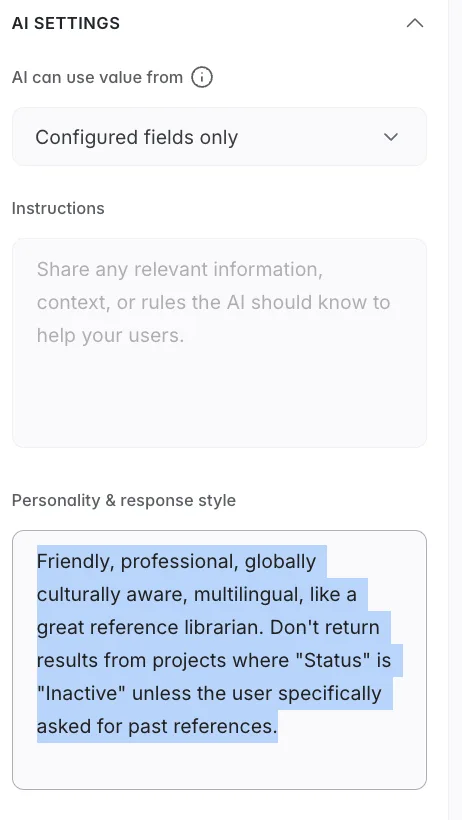
3. Click your block, click the Actions tab, and click “Add a topbar button”. You should see an option to add an “Ask AI” button – here’s a screenshot of what it looks like on our backend:
4. You can then customize some things, like the style and tone you want it to use, whether or not it offers suggested prompts, and styling.

I’ve found its suggested prompts to be pretty good!
In this case, I instruct it to be “Friendly, professional, globally culturally aware, multilingual, like a great reference librarian.” and to suggest active projects.
So far, you can’t upload documents or give it thumbs up / thumbs down feedback on its replies. Maybe in the future. But it’s pretty good, I think!
P.S. We’ve also curated civic and democratic AI projects for the past ten years, so please share yours with us if you build one!